When the Login Page Is a Real Browser: Inside a BiTM Kit That Beats MFA
A phishing kit that streams you a real Google sign-in from the attacker's own browser, so your password and MFA approval land in their session. How it works, how to clean up after it, and the Google SecOps detections that catch it.


A friend of mine who's a producer, was one of several people caught by a genuinely clever phishing attack a couple of weeks ago. Because I'm the type of person that fixates on things that annoy me, I spent a weekend pulling the whole thing apart. What sat at the end of it was a Browser-in-the-Middle (BiTM) kit: a phishing setup built specifically to bypass MFA protections. Here's how it works, and why "I have MFA enabled on" isn't always the safety net you're told it is.
BiTM is essentially a twist on the fake login page. In this case, it was targeting Gmail logins. Instead of building a clone of the Google sign-in screen, the attacker runs a real browser on their own server, points it at the real accounts.google.com, and streams you a live video of it. There is nothing odd on the screen to the victim. You are looking at Google... just a copy of it running on someone else's computer. When you type your email, enter your password, and approve that MFA prompt, you're doing all of it inside the attacker's browser session. There's no session cookie to "steal" and replay later, because the attacker's browser is already logged in.
That's the part that pissed me off and made me write this up. Nobody messes with my acting family! Let me walk you through how it gets there.
It starts with a PDF
The PDF itself contains no malicious logic. What it does have is a single hyperlink, hidden behind a "VIEW DOCUMENT" button, with the web address deliberately scrambled so a text search of the file never turns up the domain.
There is a common belief that clickable buttons in a PDF "don't work" or are automatically stripped out. That is not true for this kind of link. A plain web link is part of the core PDF format and opens in every major reader. In Chrome's built-in PDF viewer, it opens with no warning at all. The attacker didn't fail to weaponize this file, they knew this would likely evade email filtering. The risk here is 100% after the click.
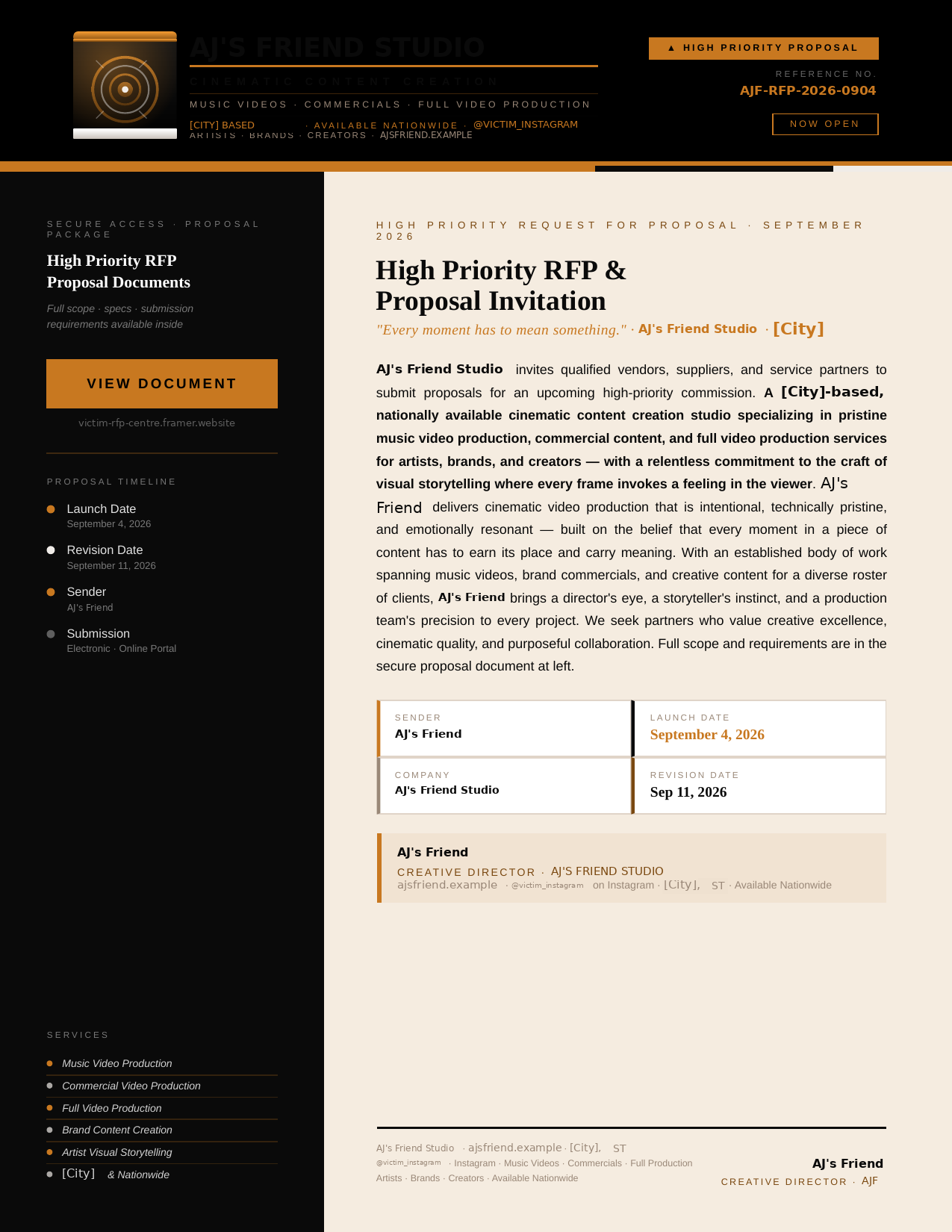
Figure 1. The lure. No exploit, no macros, no JavaScript, and nothing for a scanner to flag. One link, with its address scrambled so a text search of the file never turns up the domain. Identifying details of the impersonated studio have been substituted.
A chain built to dodge filters
Clicking the link does not take you straight to the malicious kit. Counting the PDF as stage 1, it hops through four more stops, each one there for a reason:
- A Framer[.]com (free website builder) page that has one job, "reputation laundering". Because Framer is a clean trustworthy domain, it gets past URL filters. This page contains a "view secure document" button enticing the recipient to open a RFP.
- A page hosted on Cloudflare's developer platform that shows a fake captcha. This is where all of the kit's anti-analysis tricks live. It actively fights users from opening the developer tools to inspect the code.
- A behind-the-scenes (pun intended) request that quietly builds your session and hands back the actual viewer.
- The viewer itself, the streamed remote browser described above, pointed at Google. This is basically the Trojan Horse of phishing.
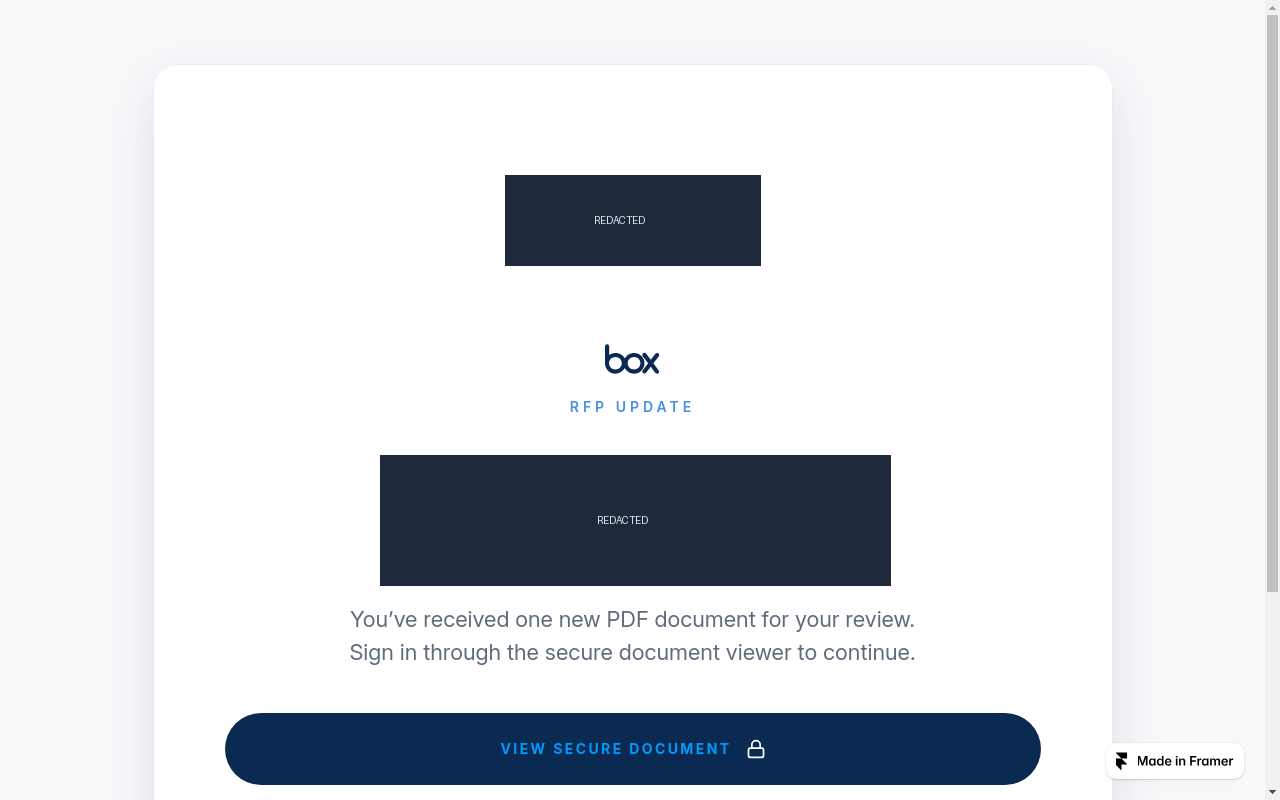
Figure 2. Stage 2: A clean, form-free page on a free site builder, there simply to launder reputation past URL filters.
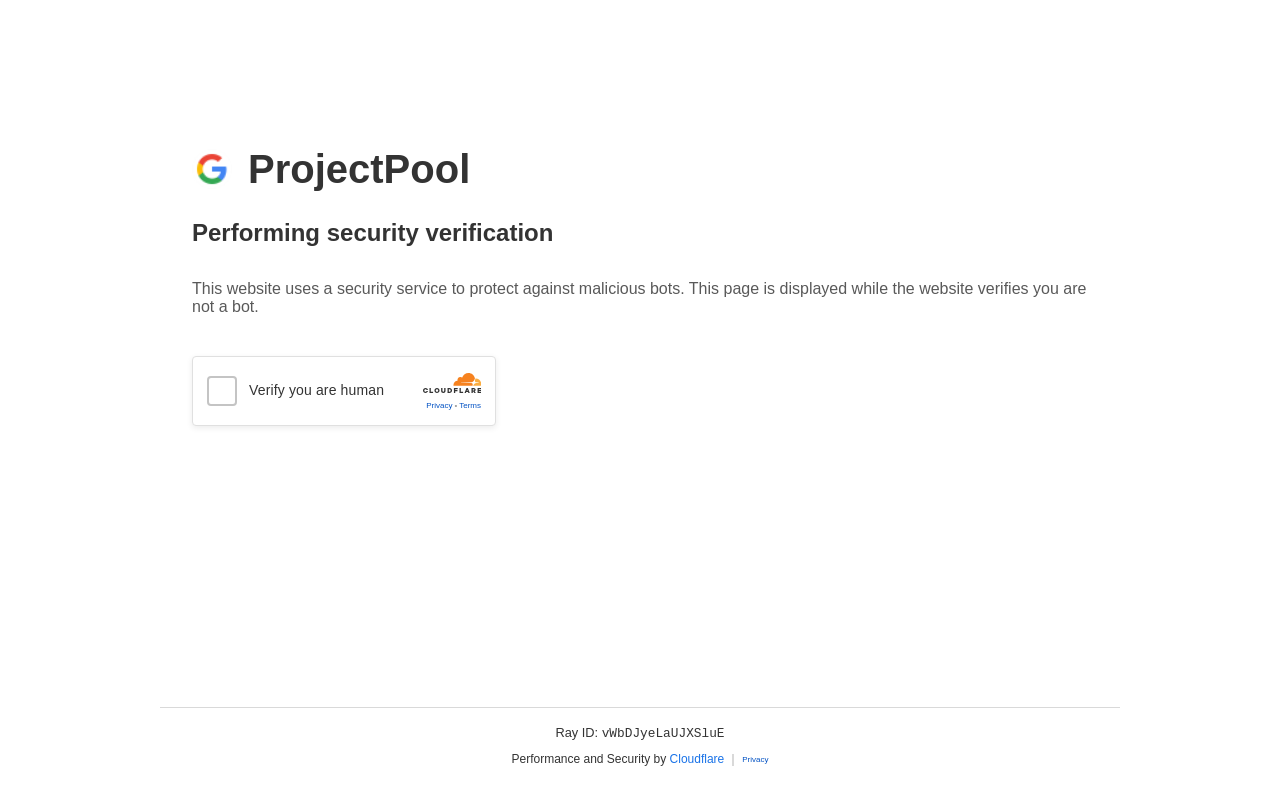
Figure 3. Stage 3: The counterfeit "security verification" screen. The Turnstile widget, the Cloudflare branding, and the Ray ID are all fake; clicking the checkbox is what opens the relay.
If it works, you are shown a Google login, you sign in, and afterward you are handed a harmless looking Google Doc to complete the masquerade.
The part that should have a login form and doesn't
When I investigated the viewer, I noticed something was missing. There is no capture of username/password in the kit. This drove me mad for several hours as I tried to enumerate where this could be. See, in an ordinary phishing kit, that credential grabbing code is the whole point. You want to capture username/password combinations so you can use them. Here it simply does not exist.
It doesn't need to. And this is what annoyed me. I knew it didn't have to exist, but I saw how sloppy the actor was on the panel and thought it might. The login form you see is not really on the page the user is on, it is a streaming picture of the real Google login frame by frame, and your keystrokes are being sent back to the attacker's browser. The password is entered on their machine. The MFA prompt is approved on their machine. When you finish, they are the ones holding the live, authenticated session. No need to supply user/pass because they can use the session that you authenticated for them on their own device. More on this later.
The channel that carries all of this is a WebSocket. Clicking the counterfeit Turnstile checkbox is what opens it. A connection to the relay host answers immediately with a per-session token. Both ends combine that token with a hardcoded key in the page to derive a session key, and everything after that is AES-GCM encrypted JSON in both directions. Inbound messages include progress checks, URL updates as the remote browser navigates, and the rendered frames of the page itself. Outbound go your keystrokes, your clicks, your mouse movements.
The traffic summary from one detonation tells the story on its own:
[ 18.15s] ACTION checkbox clicked
[ 18.66s] *** WEBSOCKET OPENED -> wss://<relay>/ws
[ 19.06s]     WS RECV #1  61B {"type": "_enc_tk", "tk": "..."}
[ 20.53s]     WS RECV #3 182B {"type": "progress", "message": "Navigating to https://accounts.google.com"}
[ 20.53s]     WS RECV #5 187B {"type": "urlUpdate", "url": "https://accounts.google.com/"}
[ 33.66s] WS SUMMARY {"rx": 32, "rxB": 135146, "tx": 2, "txB": 1980}
Thirty-two frames in, two frames out. That asymmetry is the whole attack. The victim's browser is a screen and a keyboard for a session running on an attacker's box.
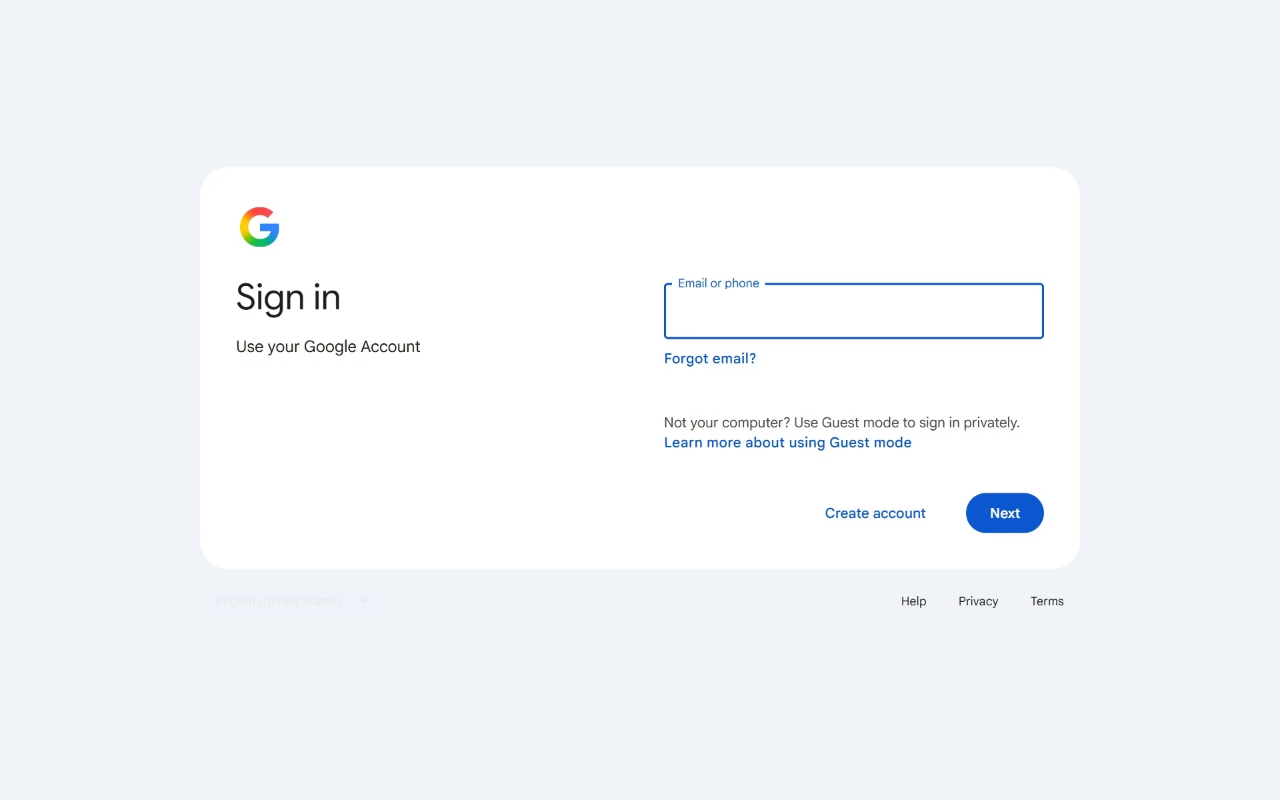
Figure 4. Stage 5, about 7 seconds after the click. This is the genuine accounts.google.com sign-in page that is rendering on the attacker's machine and streamed to the victim as images.
Under the hood, the "security" is held together with tape
Here is the part that I said annoyed me. For a kit this effective at the front, the internals are sloppy. Like I coded it and forgot to run an adversarial review sloppy.
The code that is supposed to keep the attacker's own traffic secret uses encryption keys that are hardcoded and shipped inside the page to every single victim. This means anyone who looks can read them! That whole part about fighting users from using the Developer Tools, you can just expand the hamburger button on the top-right and select Developer Tools. It attempts to block the keyboard shortcuts. The operator's own configuration ships alongside every phishing page, lightly obfuscated with a fixed phrase I recovered in seconds (even without AI).
The operator's "control panel"? It is baked into the very same page the victims interact with. There is no separate admin website, /panel, or cpanel to find and no login form to break into. An operator simply types a 10 character password on the fake security check screen and the console appears in place. So what is that password? It turned out to be nothing more than the campaign's own reference number. The check happens in your browser, not on their server. It is security theater. See what I did there? Unfortunately, none of that changes how dangerous or successful the kit is to a victim. It tells you a lot about who is running it and how these kits get resold and reused, or maybe even vibe-coded on abliterated models or by coercing the model into helping you "research". Another surprise I found, a reused decoy file and an identical scrambling phrase tie this operator to an earlier campaign from February 2026, aimed at the same kind of small creative businesses.
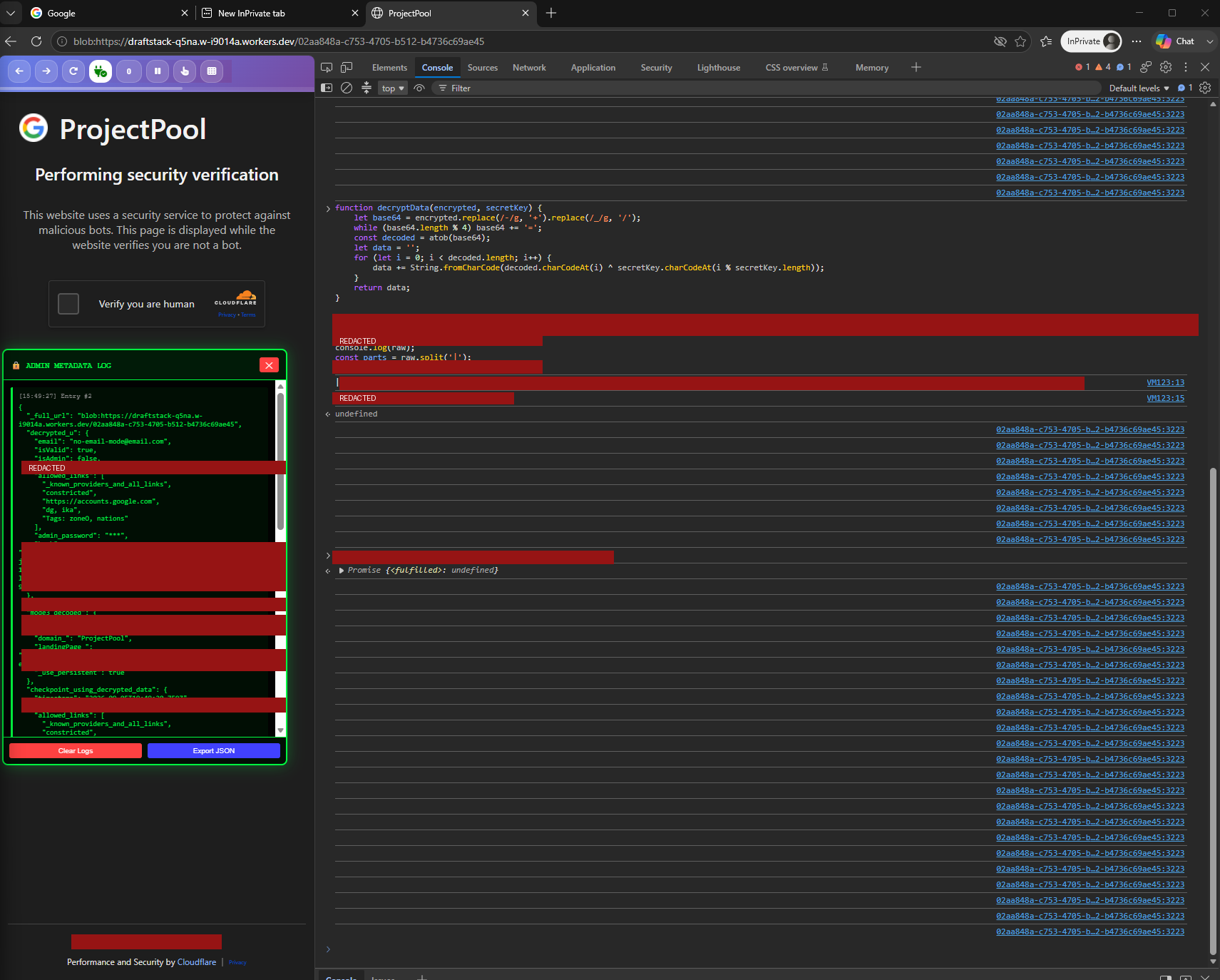
Figure 5. The "control panel," such as it is. The decrypt function, the operator's configuration and the admin password all live in the page that every victim receives; the console is simply printing what the kit already handed over. Keys, the relay host and the password are redacted.
Why this matters for YOUR business
The uncomfortable takeaway is that multi-factor authentication did not stop this. MFA is still essential and you should absolutely keep it on. A push approval or a six-digit code does not help when you approve it inside the attacker's browser. This is why device code phishing is popular as well. The thing that gets stolen is the already-approved session, not the code.
It also means a password reset alone does not fix a compromise like this and this is the damning part. The attacker is left holding a live, logged-in browser. Unless you revoke that session, they keep their access. Because they are driving a real browser in real time, you have to assume they may have done more than watch. They may have added a recovery email or phone number, enrolling their own authenticator, creating an app password, or setting up mail forwarding, all of which survive a simple password change. The notification you would get in your email could just as easily be deleted by them because they have access. When people get compromised they tend to resort to password resets and that tends to be the safe choice, except in situations like this where a live session is compromised.
For context on how this particular email got sent: it came from a legitimate company's mailbox that had already been compromised and used to blast the lure to that company's contacts. This basically becomes a Matryoshka doll of compromise, similar to recent supply chain attacks. The messages were authenticated and looked legitimate. That is why knowing the sender hasn't been enough for a long time, and even certain threads of emails have been abused in an attack called thread-jacking.
What to Do After a Browser-in-the-Middle (BiTM) Phishing Compromise
If a user clicks a phishing link and signs in through a Browser-in-the-Middle (BiTM), treat this as an active session hijack, not a standard credential theft.
In a BiTM attack, the adversary captures live session tokens and authentication cookies after the user completes MFA. Because the attacker holds an active, signed-in browser session, the order of operations is critical: revoke access first, reset credentials second. Changing the password first alerts the attacker that they have been discovered while typically leaving their session active long enough for them to establish persistence.
If the Account is Managed in Google Workspace
All admin remediation steps are located in the Google Workspace Admin Console under Directory → Users → [Affected User].
-
Revoke the session, signout everywhere. On the user's details page, navigate to Security → Sign out user. This immediately terminates active web sessions and revokes session cookies.
-
Reset the password. Select Reset password and enable Ask for a password change at next sign-in. Execute this after terminating active sessions, never before.
-
Revoke OAuth tokens. Signing a user out does not invalidate 3rd party OAuth grants. This critical step prevents attackers from maintaining persistent mailbox access via API tokens.
- Per-User: Go to Security → Connected applications on the user's page and remove unrecognized applications.
- Tenant-Wide: Cross-check under Security → Access and data control → API controls → Manage third-party app access.
-
Revoke App Passwords. On the user's page, navigate to Security → App passwords. Any app password generated by the attacker will bypass password resets over IMAP/SMTP. Delete all existing app passwords and have the legitimate user recreate only what is necessary.
-
Audit 2-Step Verification (2SV). Under Security → 2-Step Verification, check for unauthorized authenticator apps or security keys. Regenerate backup codes immediately, as existing codes may have been exfiltrated.
-
Verify recovery details. Audit the recovery email address and phone number on the same page. An attacker-controlled recovery method provides a permanent backdoor.
-
Check Gmail for persistence mechanisms. Attackers frequently configure rules to maintain access or cover their tracks. Inspect the user's Gmail settings for:
- Mail forwarding rules
- POP/IMAP access
- Filters configured to auto-archive or auto-delete incoming messages (often used to hide alert emails or security notifications)
- Delegated account access and "Send mail as" aliases
- Tenant-Wide: Review Apps → Google Workspace → Gmail → Routing for newly added transport rules
-
Analyze log activity. In Reporting → Audit and investigation, examine the Login, Token, Admin, and User accounts audit logs leading up to and following the incident. Assume the attacker performed actions within the session and trace all accessed resources.
-
Identify impacted recipients. Inspect the Sent folder (or query Gmail log search) for messages sent during the compromise window to compile an accurate recipient list for incident notification.
If the Account is a Personal Gmail Account
Without an Admin Console, remediation must be performed directly within the affected Google Account settings.
-
Terminate active sessions. Scroll to the bottom of the Gmail web interface, click Details under Last account activity, and select Sign out of all other Gmail web sessions. Review the listed IP addresses for foreign or VPN origins.
-
Revoke active devices. Navigate to myaccount.google.com/device-activity and sign out of any unfamiliar devices.
-
Change the account password. On consumer accounts, a password reset terminates most remaining active sessions.
-
Remove third-party access. Go to myaccount.google.com/connections and revoke permissions for any applications granted access around the time of the incident.
-
Revoke App Passwords. Delete any app passwords at myaccount.google.com/apppasswords.
-
Audit 2-Step Verification. Visit myaccount.google.com/signinoptions/twosv to remove unrecognized phone numbers or authenticators, and generate new backup codes.
-
Verify recovery options. Confirm that myaccount.google.com/recovery/email and myaccount.google.com/recovery/phone are secure.
-
Inspect Gmail configurations. Check Gmail settings for malicious filters, unauthorized forwarding (Settings → Forwarding and POP/IMAP), and account delegation (Settings → Accounts and Import → Grant access to your account).
-
Run Security Checkup. Complete a final audit via myaccount.google.com/security-checkup.
Post-Incident Hardening (For All Accounts)
- Enforce phishing-resistant MFA. Deploy hardware security keys (FIDO2/WebAuthn) or passkeys, and strip weak fallbacks (SMS, TOTP, push prompts).
- In AiTM attacks, FIDO2 cryptographically binds the authentication request to the browser origin.
- In BiTM attacks, the remote browser cannot interface with your local key; disabling fallbacks prevents the attacker from triggering an MFA downgrade to capture a 6-digit code.
- Enroll high-risk users in Google Advanced Protection.
- Mandate hardware keys for executives, finance teams, and administrators.
- For Google Workspace, set Admin policies to Security Key Enforcement and disallow phone/code backups. For personal accounts, enroll in Google’s Advanced Protection Program to strip weak fallbacks and block unauthorized OAuth apps.
- Harden email authentication. Ensure SPF, DKIM, and DMARC (p=reject or p=quarantine) policies are published across all domain assets to eliminate direct brand spoofing.
- Note that while DMARC prevents domain impersonation, it cannot stop phishing messages originating from genuinely compromised partner mailboxes.
- Update user security awareness.
- Train staff to spot social engineering lures and recognize MFA downgrade behavior. Teach users that if their normal login flow requires touching a security key or passkey, but suddenly falls back to requesting an SMS or 6-digit authenticator code, they are likely inside a BiTM relay attempt and should abort immediately.
How you can actually detect this
The defining feature of BiTM is also its weakness: the attacker's browser is the client that authenticates. Every attribute your identity provider records about that sign-in such as IP, network, device, and browser describes the attacker's machine, not yours. The victim's own computer never touches Google at all. So the place to catch this is the identity and authentication layer, not in your mailbox.
Session and token abuse is the right instinct, but it is the aftermath. Below are the signals in rough order of value, with example detections written for Google SecOps against Google Workspace audit logs, which arrive as the WORKSPACE_ACTIVITY log type.
1. Two networks on one account, one of them a VPN or hosting provider
Start with what the kit actually collects. This is the geolocation routine, lifted from the decoded viewer:
if (true) {
    var response = await fetch("https://ipinfo.io/json?token=3471fda952e444");
    var vdata = await response.json();
    /*
    {
    "ip": "185.223.28.174",
    "city": "Aachen",
    "region": "North Rhine-Westphalia",
    "country": "DE",
    "loc": "50.7766,6.0834",
    "org": "AS206996 ZAP-Hosting GmbH",
    "postal": "52062",
    "timezone": "Europe/Berlin"
    }
    */
    ip            = vdata.ip     || "0.0.0.0";
    client_country = vdata.country || "Removed";
    client_org     = vdata.org     || "Removed";
    // ...
}

var client_timezone = Intl.DateTimeFormat().resolvedOptions().timeZone || "UTC";

const meta_data = {
    ref_id, mode, mode_url, ip,
    client_country, client_org, client_region, client_city,
    client_locale: navigator.language,
    client_timezone,
    platform, gpu, windows_version,
    user_agent: navigator.userAgent,
    auto_detect_proxy_location: true,
    use_persistent: _use_persistent,
    pchromium: false
};
That commented-out block is the developer's own test response, left in the shipped code. 185.223.28.174 belongs to AS206996, ZAP-Hosting GmbH, which is rented German hosting infrastructure rather than a home connection. It is a weak lead rather than an identifier because the comment may be stale, or the address may since have been reassigned.
Two things worth pulling out of that.
First, this runs in the victim's browser. The IP, ASN, city and country the operator records describe the victim's egress; client_timezone comes from the browser clock rather than from the network. So this telemetry is the attacker profiling their target. It is not a fingerprint of the attacker, and it is not what your identity provider sees. Those are opposite ends of the connection, so make sure not to conflate them.
Second, auto_detect_proxy_location: true is a hardcoded flag in the payload. There is no proxy-selection logic anywhere in the client. Whatever it drives happens on the relay, which I never had visibility into. What it tells you is that the operator collects each victim's precise location and asks the server to account for it. Location alone is therefore a weak signal, because matching it is the operator's explicit goal.
Which leaves the network type, and the shape of the attack, as what you hunt on. A BiTM relay runs a real browser on rented infrastructure, so the authentication reaches Google from a hosting or VPN ASN by construction. In this campaign the relays sat behind Cloudflare and the origin was never exposed, so treat the ASN class as the signal rather than any specific number.
The sharper version, and the one I would actually deploy, is two distinct ASNs active on one account inside a short window, where at least one is a hosting or VPN provider. In BiTM the victim keeps using their own mail on their own device while the attacker drives a separate authenticated browser, so you get genuine concurrency from two very different networks, a pattern normal users rarely produce.
rule workspace_aitm_concurrent_session_divergence {
  meta:
    author = "your-soc"
    description = "Detects active user session activity from a non-proxy IP immediately followed by a login or session action from a VPN/Proxy/Hosting IP within 30 minutes."
    severity = "HIGH"
    priority = "HIGH"

  events:
    // Event 1: Baseline background activity from the user's primary/local network
    $e1.metadata.log_type = "WORKSPACE_ACTIVITY"
    $e1.target.user.email_addresses = $user
    $e1.principal.ip = $ip1

    // Filter out initial proxy/VPN noise for $e1
    $e1.principal.ip_geo_artifact.ip_type != "VPN"
    not $e1.principal.ip in %authorized_corporate_vpns

    // Event 2: Authentication or high-risk activity from a proxy/VPN egress
    $e2.metadata.log_type = "WORKSPACE_ACTIVITY"
    $e2.target.user.email_addresses = $user
    $e2.principal.ip = $ip2

    // Target proxy infrastructure (via UDM enrichment, Spur feed, or hosting ASNs)
    (
      $e2.principal.ip_geo_artifact.ip_type = "VPN" or
      $e2.principal.ip_geo_artifact.network.asn in %hosting_asns
    )
    not $e2.principal.ip in %authorized_corporate_vpns

    // Behavioral correlation logic
    $ip1 != $ip2
    $e1.metadata.event_timestamp.seconds < $e2.metadata.event_timestamp.seconds

  match:
    $user over 30m

  outcome:
    $risk_score = 90
    $target_user = $user
    $primary_ips = array_distinct($ip1)
    $proxy_ips = array_distinct($ip2)
    $proxy_event_types = array_distinct($e2.metadata.product_event_type)
    $time_delta_seconds = max($e2.metadata.event_timestamp.seconds - $e1.metadata.event_timestamp.seconds)

  condition:
    $e1 and $e2
}
Tune it before you trust it. The %authorized_corporate_vpns list is load-bearing, because your own VPN egress looks identical to an attacker's otherwise. ip_type depends on your enrichment source being populated, so fall back to the ASN list where it is empty. Mobile carriers and CGNAT flip addresses legitimately, and roaming users on hotel or airport Wi-Fi sometimes land on hosting-adjacent networks. The thirty-minute window catches the overlap without drowning you in travel noise.
2. What the identity provider can see on its own
Setting aside anything the kit collects, the relay's browser is a throwaway: a fresh profile with no history, no prior cookies for the account, and a user-agent string that has never appeared for that user before. A session whose declared attributes do not line up with the user's established baseline is worth a point of risk on its own, even when no single field is damning.
3. Unrecognized, unmanaged device
The attacker's browser is a throwaway profile: no history, no device certificate, no prior cookies for the account. If context-aware access requires a managed or company-owned device for the applications that matter, this attack fails at the door. Detection is the fallback; the access policy is the fix.
4. Post-authentication persistence, in-session
The highest-confidence "we have already lost" alert, and the one worth paging on. Each of these survives a password reset, which is exactly why the attacker sets them up. The sequence is the detection: a first-time sign-in from a new network, followed within minutes by a persistence action.
rule workspace_bitm_login_and_persistence {
  meta:
    author = "your-soc"
    description = "Baseline detection: Identifies a successful login from an untrusted network immediately followed by a high-risk persistence action (OAuth, MFA downgrade, forwarding)."
    severity = "CRITICAL"

  events:
    // Event 1: The attacker logs in from an untrusted network
    $e1.metadata.log_type = "WORKSPACE_ACTIVITY"
    $e1.metadata.event_type = "USER_LOGIN"
    any $e1.target.user.email_addresses = $user
    $e1.principal.ip = $ip

    // Exclude corporate networks to enforce the "new/foreign network" narrative
    not $ip in %authorized_corporate_vpns

    // Event 2: The attacker drops a backdoor from that same session/IP
    $e2.metadata.log_type = "WORKSPACE_ACTIVITY"
    any $e2.principal.user.email_addresses = $user
    $e2.principal.ip = $ip

    // Target verified Google Workspace persistence log events using regex for compiler safety
    re.regex($e2.metadata.product_event_type, `^(authorize|2sv_enroll|2sv_disable|recovery_email_edit|recovery_phone_edit|email_forwarding_out_of_domain)$`)

  match:
    // Groups the activity if it happens within a short 15-minute window
    $user over 15m

  outcome:
    $attacker_ip = array_distinct($ip)
    $persistence_action = array_distinct($e2.metadata.product_event_type)

    // Calculate time difference to ensure the login happened before the persistence
    $time_delta_seconds = max($e2.metadata.event_timestamp.seconds) - min($e1.metadata.event_timestamp.seconds)

  condition:
    // Enforce sequence: Both events occur, and the persistence action happens AFTER the login
    $e1 and $e2 and $time_delta_seconds > 0
}
Note that the event names are not stylistically consistent, and that is not a typo: the Workspace Reports API uses lowercase names in the token and user_accounts audit applications (authorize, 2sv_enroll) and uppercase in admin (CREATE_EMAIL_MONITOR). Check the event names for the application you are querying rather than assuming a convention.
Two log sources feed that rule and each is worth its own hunt: the Token audit log for new OAuth grants (authorize, with the client ID and requested scopes) and the User accounts audit log for MFA, recovery and external forwarding changes. If the compromised account is an administrator, add the Admin audit log, where delegation and mail routing changes land.
5. MFA method downgrade
A user who normally authenticates with a passkey or security key suddenly completing a push or a six-digit code is worth a look. That is what a relayed session looks like when the strong method cannot be used. The attacker's browser has no access to the victim's authenticator, so the flow falls back.
Baseline each user's normal login_challenge_method over 30 days and alert on the change, rather than on any single event.
6. Token reuse across networks
The tail end of the attack. Where signal 1 catches the relay authenticating alongside the real user, this catches an already-established session being driven from somewhere new: a refresh token or session cookie surfacing from an ASN the account has no history with, or from two networks too far apart for the time between them.
rule workspace_session_two_asns {
  meta:
    description = "Same account authenticated from two distinct ASNs in a short window"
    severity = "MEDIUM"

  events:
    $a.metadata.log_type = "WORKSPACE_ACTIVITY"
    $a.metadata.event_type = "USER_LOGIN"
    $a.target.user.email_addresses = $user
    $a.principal.ip_geo_artifact.network.asn = $asn_a

    $b.metadata.log_type = "WORKSPACE_ACTIVITY"
    $b.metadata.event_type = "USER_LOGIN"
    $b.target.user.email_addresses = $user
    $b.principal.ip_geo_artifact.network.asn = $asn_b

    $asn_a != $asn_b

  match:
    $user over 1h

  outcome:
    $risk_score = 60

  condition:
    $a and $b
}
Turn on continuous access evaluation where your provider supports it, so that when you do revoke, it propagates in minutes rather than at the next token refresh.
What stops it outright
Phishing-resistant MFA. WebAuthn credentials are bound to the origin and live in hardware on the user's own device, so there is nothing for the attacker's browser to relay. The victim's authenticator is never invoked at all. Passkeys and security keys turn this from a compromise into a failed login. Everything above is what you run for the accounts you have not moved yet.
Indicators and hunting
The delivery domains and relay hosts in this campaign rotate on a timer, so blocking a single hostname buys you very little. Hunt on the technique and the reusable fingerprints instead:
- Mail gateway: flag PDFs whose link addresses use octal escape sequences (
\05or\07). Legitimate documents do not scramble their URLs this way - Endpoint/network: an outbound WebSocket connection (
wss://…/ws) to a newly seen domain, opened from a*.workers.devpage, with traffic heavily skewed inbound (the 32-frames-in, 2-out pattern above) - Content: the fixed scrambling phrase the kit reuses across campaigns makes an excellent string for identifying domains with threat hunters
- DNS/proxy: watch links that chain a free site-builder domain into a
*.workers.devaddress
The scrambling phrase - tested
That third bullet is easy to assert but rather than putting the onus on you to run it, I proved it out. I ran the phrase as a hunting string to see what it turned up. It works, and it surfaced more domains and victim industries.
Searching for it returns the February writeup I already knew about and a Russian-language summary that names the entire kit family "Nyasher," after the key itself. That name then leads to English reporting I had not seen, covering campaigns from December 2025 through July 2026 against US property management firms, video production agencies, and generic RFP and bid-notification lures.
Two of the hosts in that reporting are ones I was already holding:
unbrackish.hfistty.topappears in a July 2026 analysis by cside. It is the exact host named asserver_urlin the operator configuration I recovered in September.sage.bucking.topandgold.sommiedo.siteappear in ZeroBEC's writeup covering December 2025 to June 2026 against property management. Both relays were still alive in this campaign.
The same relay pool served real estate in the spring and a video studio in September. These are not one-off domains spun up for a single target; they are shared infrastructure with a long service life, which is exactly why a content fingerprint beats a blocklist.
All of the delivery hosts follow the same shape, <words>-<4char>.w-<6char>.workers.dev, with a -2 sibling acting as the session broker and a /create endpoint on it. Campaign identifiers are consistently ten digits. The same zrawHazh field, the same no-email-mode@email.com default, and the same ADMIN METADATA LOG panel appear across every sample. Any one of those is a better hunting signature than a hostname that rotates every twenty minutes.
Related public reporting, for anyone who wants to pull the thread: cside, ZeroBEC, Surface Security, and the original DarkMarc analysis.
For file details and related activity, run the sample through your favorite sandbox (Joe Sandbox, AnyRun, VMRay) and check the hash in VirusTotal.
Conclusion
As defenses are getting better, so are attackers, and this never ending game of cat & mouse will continue. The main takeaway is it is not impossible for an attacker to gain access, but there are steps we can take to make it not worth their time. By adding friction to the attacker's attempt to gain access, such as requiring FIDO keys, they may get deterred and move on. This may be especially true when attacks are scripted or leveraging AI, which was not proven to be the case in this example. In this example, the attacker created a fake site used to imitate my friend's company, popped their Google account, and then blasted emails to everyone. This attack highlights the need to not only know the person, but to be able to identify when something is odd. If you only looked at the screen and not the URLs or logic being loaded in the page, would you have fallen to this attack?