Your SIEM Is Only as Good as the Coverage Running On It: A Guide to SIEM Rules and Tuning
SIEM rules decide what your SIEM catches, and SIEM tuning keeps them catching it. Why coverage falls behind threats, how to tell if your rules work, and how to tune them.


SIEM rules decide what your SIEM actually catches. Everything else it does (collecting, parsing, storing, searching) only matters if a rule turns the right events into an alert. SIEM tuning is the work of keeping those rules firing on the right things as your environment and the threats against it change.
When a security program isn't delivering what it should, the SIEM usually takes the blame. But your SIEM isn't the problem. The gap between it and your SecOps program is. Coverage falls behind the threats in two ways: new threats take months to cover, and the rules you already have stop working without telling anyone. That drift is the cause of many coverage woes, but it is frequently ignored by security teams.
This guide covers what SIEM rules are, why coverage falls behind, how to tell whether your rules work today, and the tuning practices that keep coverage moving.
What are SIEM rules?
A SIEM rule (also called a detection rule, analytics rule, or correlation search) is a saved query that runs against your log data and raises an alert when it finds a pattern worth a human's attention. Most rules fall into a few types:
| Rule type | What it looks for | Example |
|---|---|---|
| Single-event | One event that's suspicious on its own | MFA disabled on an admin account |
| Threshold | Too many of something in a time window | 50 failed logins for one user in 5 minutes |
| Correlation | A sequence across sources | A new inbox forwarding rule, then a large mail export, from the same user |
| Anomaly | A departure from a learned baseline | A service account logging in from a new country |
| Threat-intel match | Known-bad indicators | Traffic to a domain on a threat feed |
Every SIEM has its own name and language for them: analytics rules in Microsoft Sentinel (KQL), correlation searches in Splunk (SPL), and YARA-L rules in Google SecOps. Open formats like Sigma describe a rule once and convert it to each SIEM's language. The idea is the same everywhere. A rule is only as good as two things: whether it describes a threat that matters to you, and whether the data it needs is actually arriving in the shape it expects.
What are SIEM correlation rules?
Correlation rules connect events from different sources, or the same source over time, into one alert. They catch behavior that looks harmless one event at a time, like a login followed by a privilege change followed by audit logs going quiet. They're also the most fragile kind of rule, because they depend on several data sources lining up at once.
Why SIEM coverage falls behind the threats
Attackers now move at machine speed. CrowdStrike's 2026 Global Threat Report put average eCrime breakout time at 29 minutes, and Mandiant's M-Trends 2026 found global median dwell time rose to 14 days, from 11. In addition, new techniques now show up every week. Updating the SIEM to catch them still takes months, and the coverage you already built erodes while you wait.
1. New threats take months to cover
Covering one new threat means researching it, checking whether it applies to your environment, working out which logs and fields would show it, writing a rule for your schema, and then testing and tuning it. On average, a new detection takes 121 days to author. Multiply that by the number of threats any real program faces, and the backlog isn't a staffing problem you can hire your way out of.
2. The rules you have break quietly
A rule depends on things that change constantly: log schemas, parsers, source categories, lookup tables, and SIEM configuration. When one of them changes, the rule usually doesn't throw an error. It stops matching, silently. Even when a rule fails outright, the signal is easy to miss: Microsoft's troubleshooting guide for Sentinel analytics rules lists a deleted table, a removed data source or a modified function as causes of permanent failure, and after repeated failures Sentinel disables the rule automatically and flags it in the rule's name. Microsoft's advice is that SOC managers check the rule list regularly.
When Spectrum's Delta research team checked deployed rules against live customer systems for The Detection Debt Report 2026, nearly 3 in 10 (29.2%) could not fire under any circumstance. Most of the failures traced back to the data:
| Why the rule couldn't fire | Share of broken rules |
|---|---|
| The field it reads moved | 30% |
| The field's value changed | 26% |
| The logs never arrived, or went dark | 22% |
Two thirds of broken rules failed on the data they read. Genuine syntax errors were under 1%, because those get caught. And the rules that broke weren't obscure: an MFA-disabled detection was broken in 88% of the environments that deployed one.
Real examples look mundane. A threat-intel feed's API key expires and the indicator list drains to empty. A field that held one value starts arriving as a list, and an exact match stops matching. A vendor starts hashing usernames for privacy, and every rule keyed on the username is now comparing against a hash. (More in Detection Health.)
3. Noisy rules get switched off
The other way a rule fails is loudly. A rule that was never scoped to your environment fires on normal activity until the team stops trusting it, mutes it, or disables it. Either way the coverage is gone. Across the environments we've worked in, 77% of alerts should never have fired. It's the problem teams feel most: in the SANS 2025 Detection and Response Report, 73% of respondents named false positives as their top detection challenge, up from 64% the year before. Noise is the symptom you can see. Missing coverage is the one you can't.
What SIEM tuning actually means
Most teams think of SIEM tuning as making a noisy rule quieter. That's part of it, but the goal is accurate coverage: the rule fires when the threat happens, and doesn't fire when it doesn't. Some tuning moves get you closer to that. Others trade coverage for quiet. Microsoft's own guidance on false positives in Sentinel makes the same point: keep exceptions narrow, combining several attributes, and let temporary ones expire, so a fix for noise doesn't become a blind spot.
| Tuning action | What it fixes | What to watch |
|---|---|---|
| Scope the rule to your environment (your admin groups, your service accounts, your network) | Noise from activity that's normal for you | Scope by specific identities and assets, not whole subnets or directories an attacker could use |
| Fix the data dependency (repoint a moved field, restore a dead source) | Silent failures | Find every other rule that reads the same field |
| Allowlist known-good activity at the source | Repeat noise from expected behavior | Review allowlists on a schedule; they drift too |
| Adjust thresholds and time windows | Rules that fire on volume that's normal for you | Base the new threshold on your own data, not a default |
| Suppress or deduplicate | Many alerts for one incident | Suppress repeats, not first occurrences |
| Retire the rule | Rules that cover no threat that matters to you | Confirm nothing else depends on it, and record why |
| Disable the rule because it's noisy | Nothing. The noise stops and so does the coverage | Treat it as an open coverage gap, not a fix |
5 questions to ask about your SIEM rules
You don't need to read every rule to know whether coverage is keeping up. These questions tell you where you stand.
- What share of our rules could fire today? Not how many rules we have: how many would produce an alert if the behavior happened right now. If nobody can answer, that's the answer.
- How long does it take to go from a new threat to production coverage? Measure it for the last three threats your team responded to. Weeks or months is normal, and it's the gap.
- Which rules haven't fired in 30 days, and are they dormant or dead? A quiet rule might be healthy with nothing to catch, or broken. Only checking its data dependencies tells you which.
- What changed in our log sources last quarter? New parsers, connector upgrades, vendor schema changes, retired sources. Each one is a reason a rule might have stopped working.
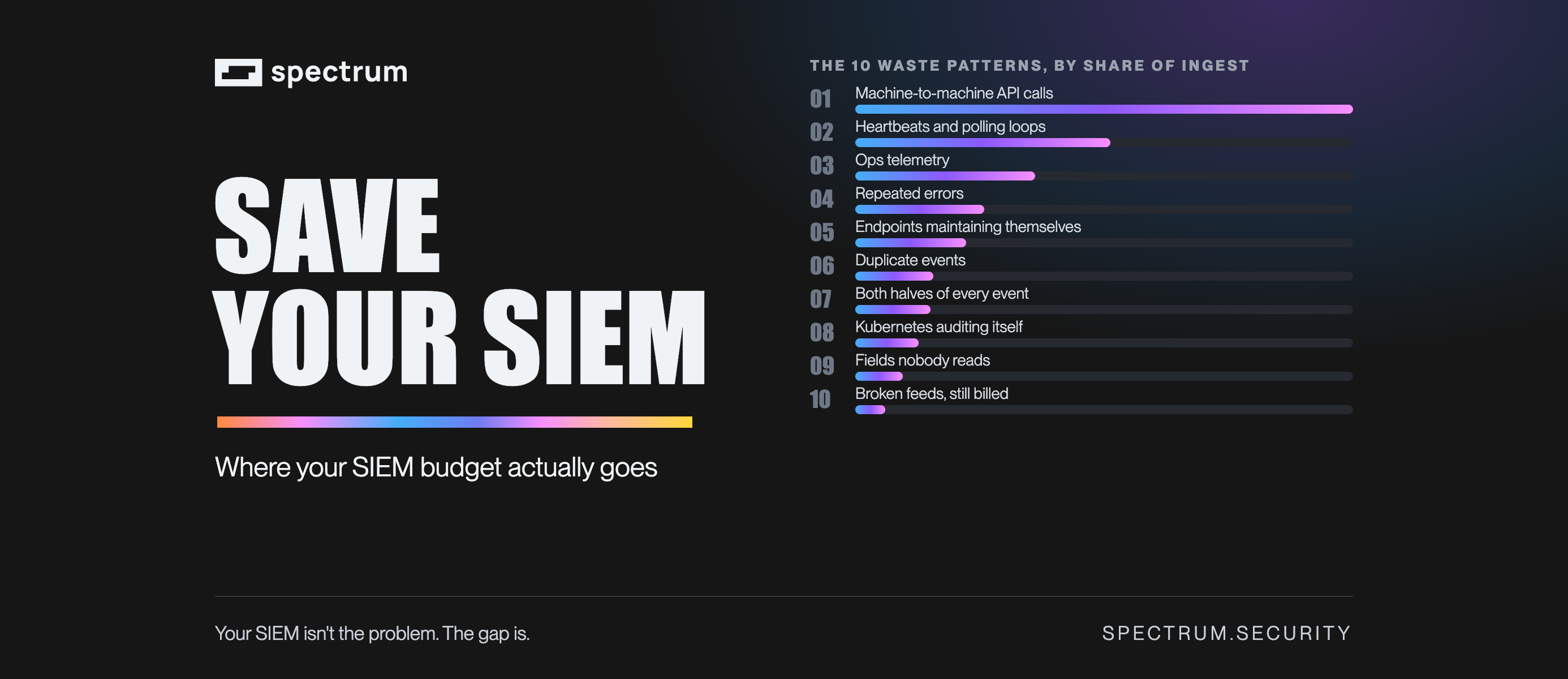
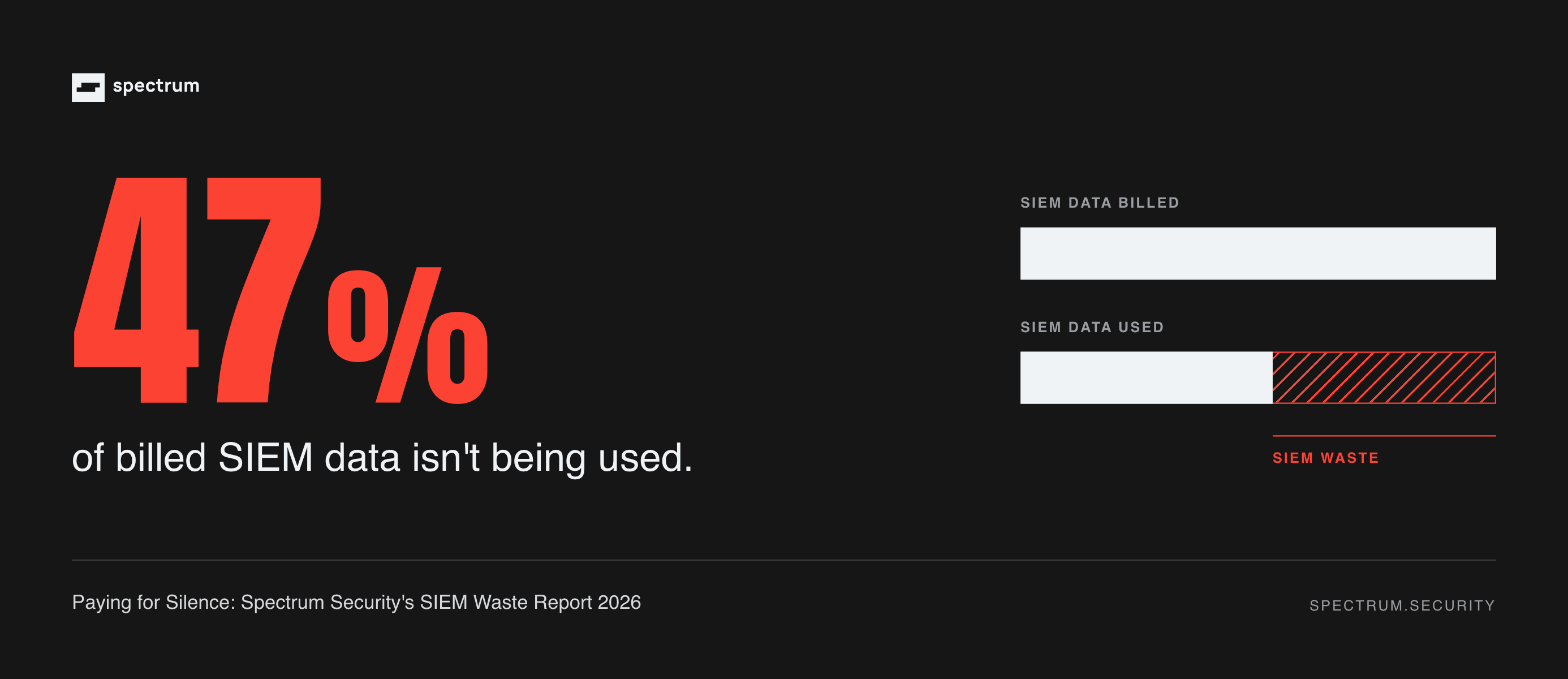
- What data does each rule depend on? If you can't tie rules to the data they read, you can't tell which data is earning its place either. In the median environment we measured, 47% of billed ingest was read by nothing (where your SIEM budget actually goes).
SIEM rule tuning best practices
- Start from the threats that matter to you. Prioritize coverage by the threats relevant to your environment. Rule count tells you little: in the Detection Debt Report, rule count and broken rate were effectively uncorrelated.
- Validate against live data, continuously. Keep detections as code with tests in CI, the way projects like Elastic's detection-rules repo do. Those tests confirm a rule parses and its logic is sound at commit time. Rules break later, in production, when the data changes. Check every rule's dependencies against live data on a schedule, and replay real attack behavior (open test libraries like Atomic Red Team map tests to MITRE ATT&CK) to prove a rule fires.
- Tune at the source. Fix the scope, the threshold, or the data dependency in the rule itself, so the bad alert is never produced. Handling it downstream only makes the noise cheaper to process.
- Tie every rule to the data it reads, and write down what it assumes. Map each detection to the sources and fields it needs; MITRE ATT&CK calls these data components. Palantir's Alerting and Detection Strategy framework asks every new alert to document its blind spots, assumptions and validation before it ships. That record is how you find breakage when a source changes, and how you know which data you can safely tier or drop.
- Measure detection health as a number. "What percentage of our detections work?" should have an answer you can track and report, the same way you report patching or uptime. In Kyle Bailey's Detection Engineering Maturity Matrix, the gap between the lowest and highest levels is exactly this: little or no active maintenance at the bottom, continuous maintenance that catches failures before they matter at the top.
- Feed SOC verdicts back into tuning. When analysts close an alert as a false positive, that verdict should change the rule as well as close the ticket.
- Retire deliberately. A rule that covers no threat that matters is cost without coverage. Retire it on purpose, with a reason, instead of letting it rot.
Why switching SIEMs won't fix it
When coverage lags and the bill keeps growing, replacing the SIEM can look like the fix. But the gap moves with you. The hardest part of any SIEM migration is the detections, and broken rules and unscoped noise port over intact into a new query language, after a 6-to-12-month-plus project. If you do move, migrate the outcome, not the debt: map what your rules actually detect and which ones work before anything moves. (More in why switching won't fix what's wrong.)
How Spectrum keeps coverage moving
Spectrum is the brain for your SecOps. It researches the threats that matter, engineers the data and detections to catch them, and keeps your SecOps stack healthy as it changes, in the SIEM you already run.
- New threats, covered fast. Spectrum builds production-grade detections for your schema and stack. Mean time to author a detection goes from 121 days to 30 minutes.
- Broken rules, caught and fixed. Every rule is checked daily against live data, with a root cause and a proposed fix when one breaks. Your team makes the final call.
- Noisy rules, tuned at the source. Mean time to tune a detection goes from 10 days to 30 minutes, so false positives stop being produced.
- Data tied to coverage. Because every detection is mapped to the data it reads, the spend nothing uses can fund the coverage you're missing.
The takeaway
Your SIEM's value is the coverage running on it, and coverage is a moving target. Rules break when the data changes, new threats outpace the authoring backlog, and noisy rules get switched off. Treat detection as a living system: start from the threats that matter, validate every rule against live data, and tune at the source. That's how you get better coverage for less spend, without replacing anything.
Want to know where your SIEM stands? Get a SIEM Second Opinion. We'll show you where the gap is in your program and what to fix first.
FAQ
What is SIEM tuning?
SIEM tuning is adjusting detection rules so they fire on real threats and stay quiet on normal activity. It covers scoping rules to your environment, fixing broken data dependencies, setting thresholds from your own data, and retiring rules that cover nothing that matters.
What are SIEM correlation rules?
Correlation rules link events from multiple sources, or one source over time, into a single alert. They catch multi-step behavior, such as a login followed by a privilege change and then audit logs going quiet, that looks harmless one event at a time.
How many SIEM rules do you need?
There's no right number. Coverage of the threats that matter to you is what counts, and more rules aren't safer rules: in the Detection Debt Report, the number of rules an environment ran had almost no relationship to how many of them were broken.
How often should SIEM rules be tuned?
Continuously. Rules depend on log schemas, parsers and sources that change without notice, so a rule that worked last quarter may not work today. At a minimum, check every rule's data dependencies after any change to a log source, and review noisy rules whenever analyst verdicts show a pattern of false positives.
Why do SIEM rules stop working?
Mostly because the data changes. In the Detection Debt Report, two thirds of broken rules failed on the data they read: a field moved, a field's value changed, or the logs stopped arriving. Syntax errors were under 1% of failures.